ProjectFlow Documentation
Everything you need to know about the AI-powered project management platform. From project creation to investor reports, explore every feature.
Watch the video tutorialsVideo tutorials
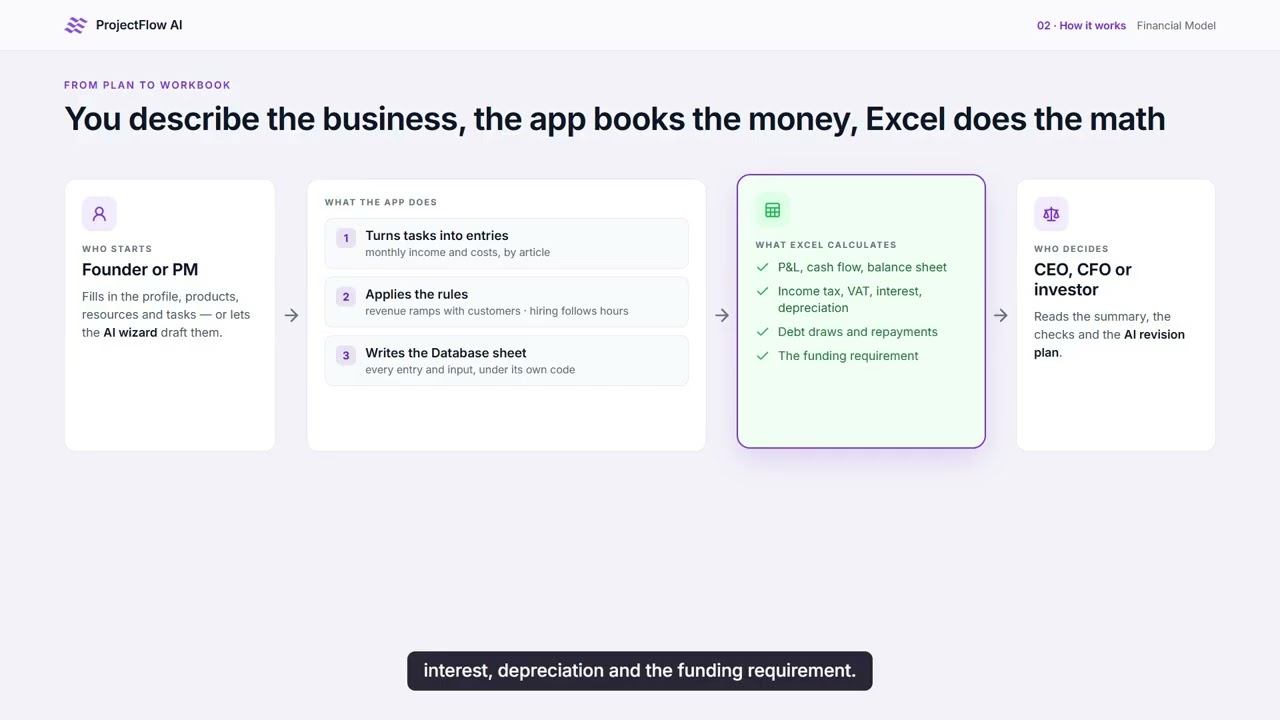
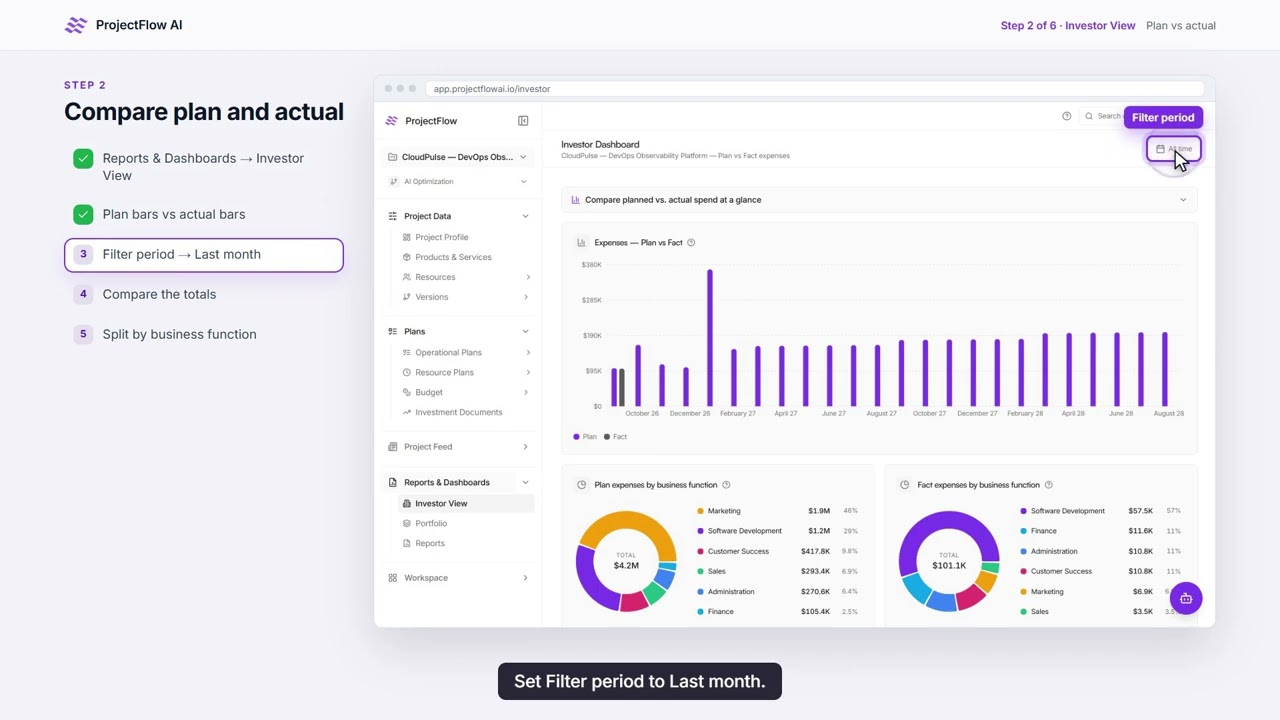
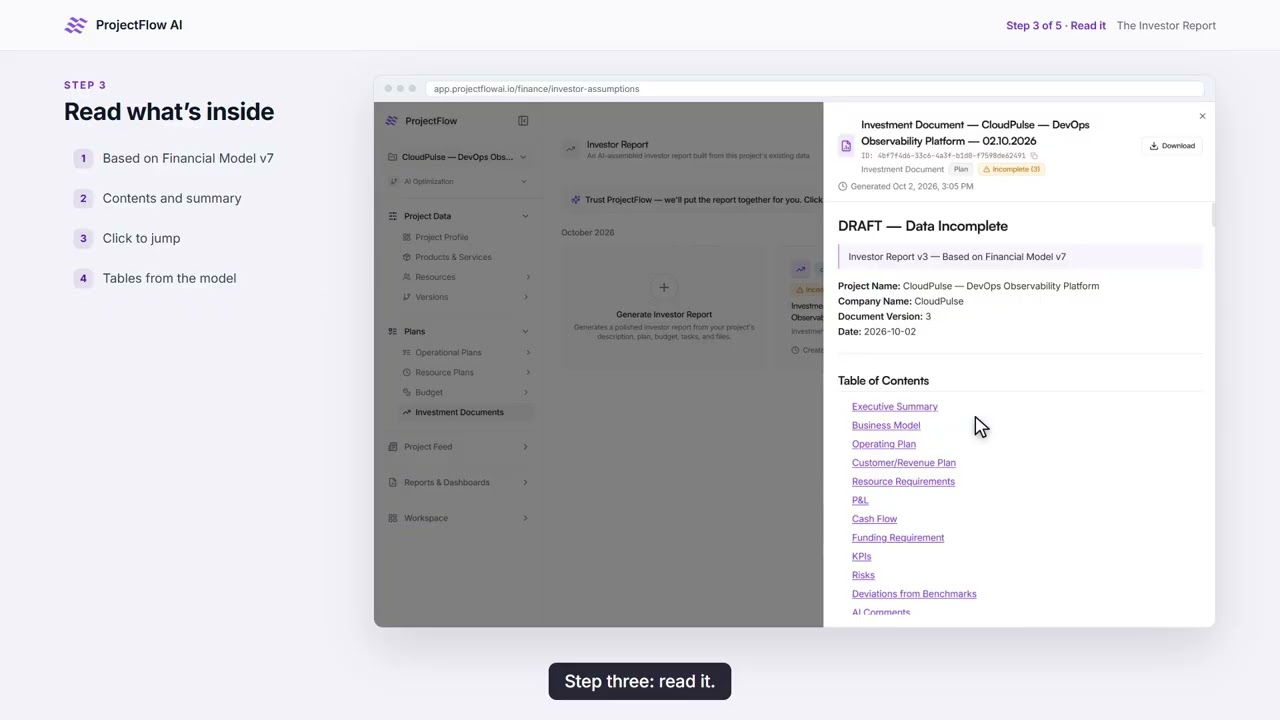
Learn ProjectFlow AI in six short videos, step by step on real screens: from your first project to a financial model, plan vs actual, versions, the investor report and AI validation.
About three minutes each. Watch them in order, or jump to the topic you need.
From Project Plan to Financial Model
How your tasks, resources and assumptions become an investor-grade financial model, and what's inside the workbook.
In this video
- Why a model built from the plan keeps every number in agreement
- How tasks and resources turn into monthly income and costs
- The executive summary, math checks, funding panel and AI revision plan
- What's inside the workbook, and how to get started
- Tutorial 1 · 3:24From Project Plan to Financial Model
- Tutorial 2 · 3:41Create Your First Project Step by Step
- Tutorial 3 · 3:22Plan vs Actual: Track Your Project Performance
- Tutorial 4 · 2:55Versions & Scenarios: Compare What-Ifs
- Tutorial 5 · 2:19The Investor Report: Turn Your Plan into an Investor-Ready Report
- Tutorial 6 · 2:46AI Validation: Check the Business Logic Behind Your Financial Model



Getting Started
See it on video
AI-Powered Project Creation
Start projects in minutes with our AI wizard, or build them from scratch with full manual control.
Task Management
Comprehensive task tracking with multiple views, subtasks, dependencies, time logging, and more.
Table View
A detailed spreadsheet-style view with sorting, filtering by status, priority, assignee, module, and date ranges.
Kanban Board
Drag-and-drop cards organized by status columns — Todo, In Progress, Blocked, and Done.
Gantt Chart
Visual timeline view showing task durations, dependencies, and overlaps for project scheduling.
Subtasks & Hierarchies
Break down complex tasks into manageable subtasks with parent-child relationships.
Task Dependencies
Define task relationships and let AI suggest dependencies automatically based on your project structure.
Time Logging
Track time spent on each task with start/stop timers or manual entries. Monitor planned vs. actual hours.
Files & Notes
Attach documents, images, and files to tasks. Add notes and comments for team collaboration.
Plan vs. Fact
Separate planned dates and durations from actuals to track schedule variance and project health.
Priority & Status
Four priority levels (Low, Medium, High, Critical) and status tracking through the full task lifecycle.
Risk Management
Identify, assess, and mitigate project risks with AI assistance and structured tracking.
AI Risk Identification
The AI analyzes your project to proactively identify potential risks — scope creep, timeline delays, resource gaps, and more.
Severity & Impact Scoring
Classify risks by severity (Low, Medium, High, Critical) with impact scores from 1 to 10 for prioritization.
Mitigation Planning
Define mitigation strategies and track risk status through Open, Acknowledged, Mitigating, and Resolved stages.
Resource Management
Manage your team members, equipment, and materials with availability tracking and cost management.
Resource Types
Track three resource categories: team members, equipment, and materials — each with tailored attributes.
Availability Tracking
Monitor resource availability from 0-100% and assign resources to tasks to prevent over-allocation.
Cost & Billing
Set cost per unit with flexible billing types — hourly, daily, monthly, or fixed. Link costs to expenses automatically.
Financial Management
Full budget planning, income and expense tracking, and budget-vs-actual analysis.
Budget Planning Wizard
AI-assisted budget creation with module-based allocations for operations, marketing, and other categories.
Income & Expense Tracking
Record all income and expenses linked to tasks, resources, or custom categories. Track transactions over time.
Budget vs. Actual
Compare planned budgets to actual spending with variance analysis. Spot overruns early and adjust accordingly.
Multi-Currency Support
Set your preferred currency per project for accurate financial tracking across international teams.
Marketing Module
Plan campaigns, generate content ideas, schedule posts, and manage marketing tasks across platforms.
Campaign Wizard
Create marketing campaigns with AI assistance. Define goals, target audiences, and platforms — get a full campaign plan generated.
Content Calendar
Visual calendar for scheduling social media posts and content across all your platforms.
AI Content Generation
Generate post ideas and content drafts tailored to each platform. Edit and refine before publishing.
Marketing Tasks
Dedicated task management for marketing activities, linked to campaigns for organized execution.
AI-Powered Features
AI is woven throughout the platform — from project planning to document analysis and smart recommendations.
AI Project Agent
Chat with an AI assistant that understands your project context. Ask questions, get suggestions, and receive real-time streaming responses.
Document Analysis
Upload PDFs, DOCX files, and images. The AI parses and indexes documents for semantic search and task extraction.
Smart Recommendations
Receive AI-generated recommendations for tasks, risks, finances, and marketing — categorized and prioritized for action.
Web Search Integration
The AI can search the web for relevant information to enrich your project plans and recommendations.
Reporting & Investor Dashboard
Generate comprehensive reports and provide stakeholders with real-time visibility into your project.
Summary Reports
High-level project overview with key metrics, progress, and status at a glance.
Task Reports
Detailed task breakdowns with completion rates, timeline adherence, and blockers.
Risk Reports
Risk register summaries with severity distribution and mitigation status.
Financial Reports
Budget summaries, income/expense breakdowns, and variance analysis.
Marketing Reports
Campaign performance, content engagement, and marketing task progress.
Full Project Reports
End-to-end project documentation combining all modules into a single comprehensive report.
Investor Dashboard
A dedicated view for investors and stakeholders with financial health scoring, progress tracking, and executive summaries.
Project Version Control
Create branches of your project to explore alternative plans without losing your original work.
Project Branching
Create new versions from any point in your project. Compare different approaches side by side.
Version Statistics
View task counts, risk levels, and budget summaries per version to make informed decisions.
AI Version Naming
Let the AI generate meaningful names for your versions based on the changes and focus areas.
See it on video
Integrations
Connect external tools and upload files to extend your project management workflow.
- Link Telegram groups to projects
- Automatic message ingestion
- Chat statistics and analytics
- Scheduled digests (daily, weekly, monthly)
- 7-day message retention with auto-cleanup
Security & Privacy
Enterprise-Grade Security
Your project data is protected with industry-standard encryption at rest and in transit.
Data Minimization
We process only what's needed for insights and don't retain unnecessary data. Delete anytime.
GDPR Compliance
We align with GDPR principles, track user consent, and honor all data subject requests promptly.
Your Data, Your Control
We never use your project data to train AI models or share it with third parties.
Your Data is Safe
We use enterprise-grade encryption, process data securely, and give you full control over your information. We comply with GDPR and honor deletion requests.
Need Help?
For assistance with projects, team setup, or any features, reach out to our support team and we'll help you get started quickly.